
Raster vs Vector Definition
Raster graphics are pixel-based, composed of a grid of pixels, while vector graphics utilize mathematical equations for composition. Raster images lose quality upon resizing, becoming pixelated, whereas vectors maintain clarity at any scale. Raster files typically require more storage due to detailed pixel data, and are favored for rich images and textures. Conversely, vector files are smaller and ideal for logos and scalable designs. Understanding these differences informs effective graphic use in various applications, revealing important insights.
Differences in Composition
The fundamental differences in composition between raster and vector graphics are critical for understanding their respective applications. Raster graphics rely on a pixel-based nature, creating images from a grid of pixels that can lose visual quality when resized. Alternatively, vector graphics utilize mathematical composition, allowing for infinite scalability without quality loss. This distinction results in significant visual quality differences; vectors maintain clarity at any size, while rasters can become pixelated. Memory requirements differ, as raster files require substantial storage for detailed pixel data, whereas vector files are smaller due to their formula-based structure, facilitating easier data compression. This means that raster files often have larger file sizes due to millions of pixels.
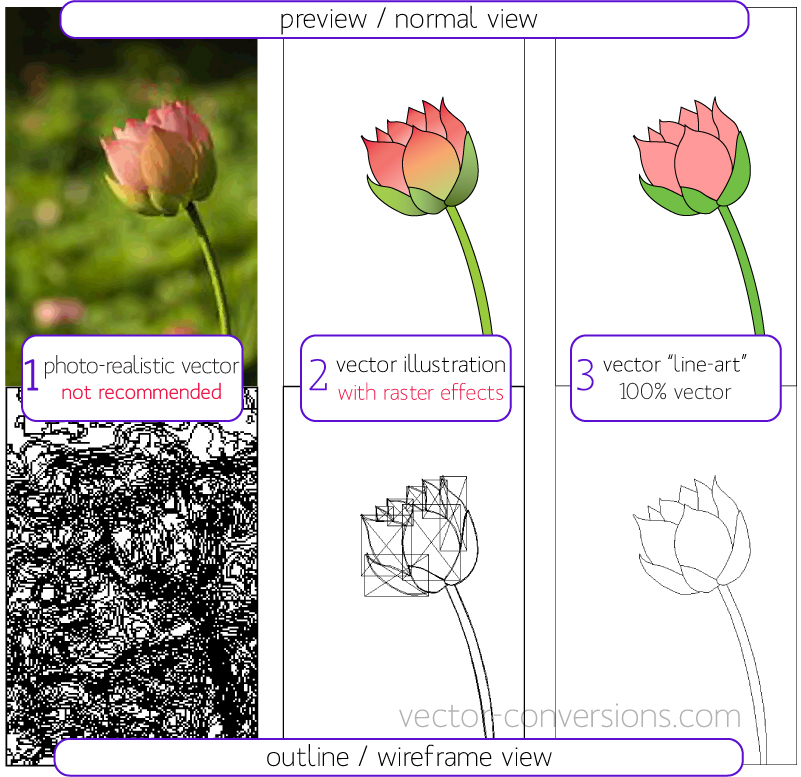
Raster (Bitmap) vs Vector by vector-conversions.com

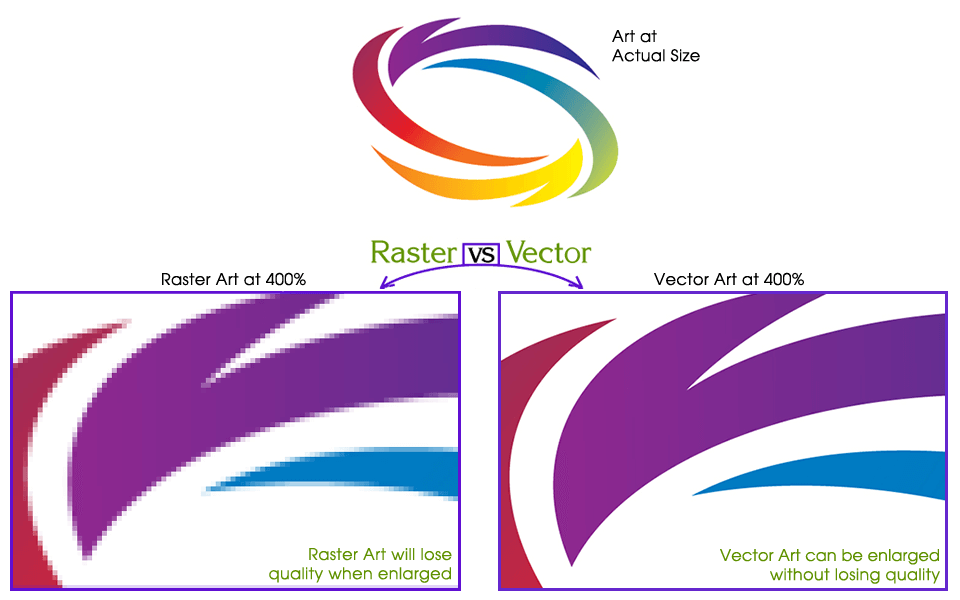
Vector Art VS. Raster Art by coreldraw.com
Use in Applications
Understanding the specific applications of raster and vector graphics is vital for professionals in various fields.
Raster graphics are commonly utilized in graphics design and print materials, offering rich textures and color depth ideal for images and photographs. Conversely, vector graphics excel in applications requiring scalability, such as logos and signage, ensuring clarity across various sizes.
In digital displays, raster images dominate due to their detailed representation on screens. Each format serves distinct purposes; therefore, selecting the appropriate graphic type is essential for effective communication and visual impact in projects spanning multiple industries, including retail and corporate marketing.
Custom Digitally Printed Flags - FlagCo.com by flagco.com
File Size and Storage
File size and storage considerations play a critical role in the effective use of graphic formats, particularly when comparing raster and vector graphics.
Vector file size characteristics generally result in smaller files, especially for simple designs, which can lead to significant storage cost implications. Conversely, raster files tend to be larger due to their pixel-based nature.
Compression techniques are essential for raster images, allowing for data optimization and reduced file sizes. The impact on performance is notable, as smaller vector files load faster and use less bandwidth, enhancing user experience and resource efficiency in various applications, including digital printing and branding materials.
Scalability and Resolution
Scalability and resolution are fundamental aspects distinguishing raster and vector graphics in design and printing applications.
Raster images are defined by raster resolution, which hinges on pixels per inch (PPI). When scaled, these images become pixelated, losing quality.
Conversely, vector graphics offer resolution independence, maintaining clarity at any size due to their mathematical nature. This vector versatility allows for seamless resizing without deterioration, making them ideal for logos and graphics.
While raster images excel at capturing intricate details in photographs, their limited scalability poses challenges in larger prints, highlighting the distinct advantages of vector graphics in various applications.

How to convert JPEG to vector image in CorelDRAW by coreldraw.com
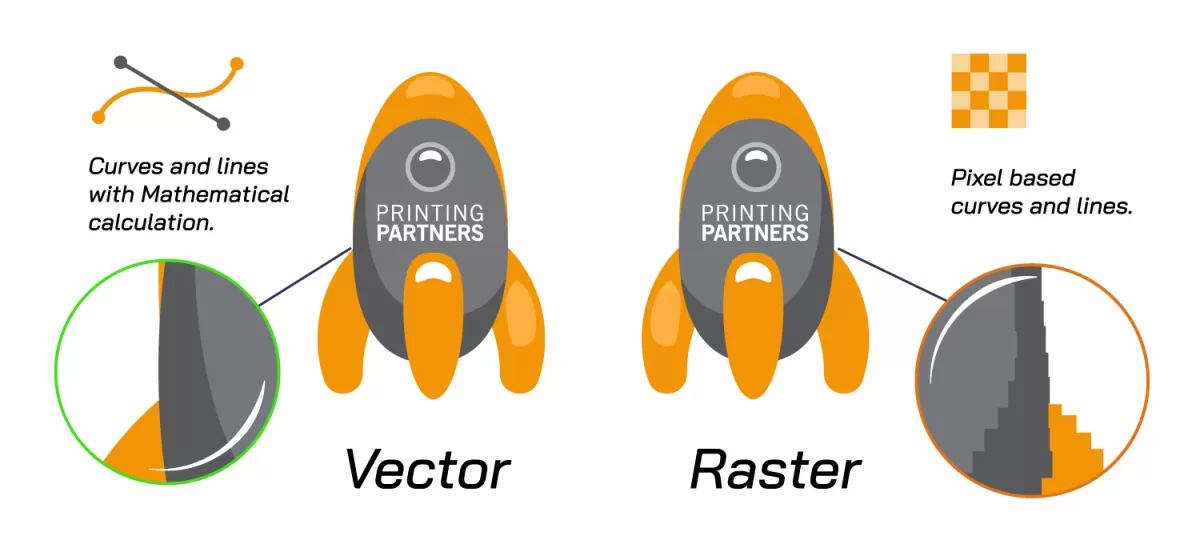
Vector vs. Raster Graphics • Printing Partners by printingpartners.net
Popular Wiki Terms:
Graphic Design and Creation
Graphic design and creation encompass a range of methodologies and tools tailored to produce both raster and vector images.
Graphic designers utilize Adobe Photoshop for raster image processing, creating detailed images that capture color nuances.
Graphic designers rely on Adobe Photoshop for processing raster images, crafting intricate visuals that showcase vibrant color details.
Alternatively, Adobe Illustrator is employed for vector path optimization, enabling the creation of scalable graphics ideal for logos and illustrations.
Each software serves specific purposes, reflecting the nature of the project.
Raster images are suited for photography, while vector graphics excel in precision and scalability.
Understanding these distinctions is essential for effective design in various applications, ensuring the right medium is chosen for each deliverable.
References & Data Sources:
https://www.adobe.com/creativecloud/file-types/image/comparison/raster-vs-vector.html – Retrieved April 30, 2025
https://vector-conversions.com/vectorizing/raster_vs_vector.html – Retrieved May 2, 2024
https://www.coreldraw.com/en/learn/tutorials/vector-art-vs-raster-art/ – Retrieved February 2, 2025
https://www.flagco.com/services/custom-flags/ – Retrieved April 25, 2025
https://www.coreldraw.com/en/learn/tutorials/convert-jpeg-vector/ – Retrieved May 2, 2025
https://www.printingpartners.net/vector-vs-raster-graphics/ – Retrieved May 2, 2025