
Crop Marks Definition
Crop marks, also known as trim or cut marks, are crucial indicators used in the printing process. They guide the precise trimming of printed materials, ensuring accurate cuts that maintain design integrity. Crop marks prevent unwanted white edges by clearly indicating the final trim area. In addition, they enhance registration accuracy across multi-sheet projects. Adhering to technical specifications, such as the inclusion of bleed and safety margins, is essential for achieving high-quality printed products. More details can be explored further.

Quick Summary
- Crop marks, also known as trim or cut marks, indicate where printed materials should be trimmed after printing.
- They ensure full bleed designs avoid unwanted white edges and enhance registration accuracy for multi-sheet projects.
- Properly placed crop marks guide cutting machines, ensuring precise alignment and quality in printed materials.
- Safety margins and bleed settings are crucial to protect important content and accommodate potential misalignment during trimming.
- Crop marks contribute to professional-quality prints, maintaining design integrity and enhancing the overall presentation of the final product.
Understanding Crop Marks and Their Purpose
Crop marks, also known as trim or cut marks, are crucial elements in the printing process that serve to guide the precise trimming of printed materials. They indicate the trim area, ensuring accurate cuts post-printing.
These marks are essential for designs requiring full bleed, as they help avoid unwanted white edges. Proper placement of crop marks, alongside bleed settings adjustment, enhances registration accuracy, minimizing alignment errors in multi-sheet projects. Crop marks are essential for creating professional-quality prints that maintain design integrity in the final product. This is why safety, trim, and bleed lines are critical in ensuring that all elements are correctly positioned within the design. Understanding the importance of offset printing can further enhance the overall quality of printed materials. Without crop marks, commercial printers may struggle to achieve consistent and accurate trimming results.
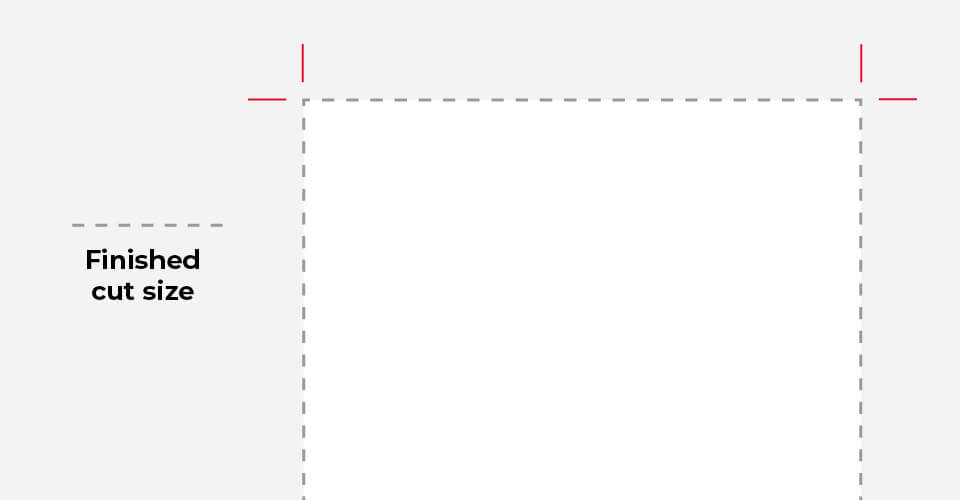
Understanding crops and bleed - Action Press by action-press.co.uk
Technical Specifications for Crop Marks
The technical specifications for crop marks are essential for ensuring accurate trimming and alignment in printed materials. Adhering to standards such as PDF/X-1a guarantees high-resolution output with visible crop marks for cutting guides. During the cutting process, it is vital to implement safety margins, typically at least ⅛ inch, to prevent critical content from being inadvertently trimmed. Various software tools, including Adobe Creative Suite and Microsoft Publisher, facilitate the creation of crop marks through export settings. Proper placement of these marks, along with extended bleed areas, helps maintain print quality while minimizing the risk of misalignment and other prepress issues. Crop marks are crucial for guiding the cutting process and ensuring the final size of the printed job is achieved accurately. Using crop marks and bleed can significantly improve the likelihood of a clean, edge-to-edge finish. Understanding printer requirements is equally important to ensure the best results from the entire printing process. The implementation of a bleed area is also essential for avoiding unwanted white borders on finished products. Ensuring that artwork files are set up with appropriate bleed sizes can further enhance the overall print quality.
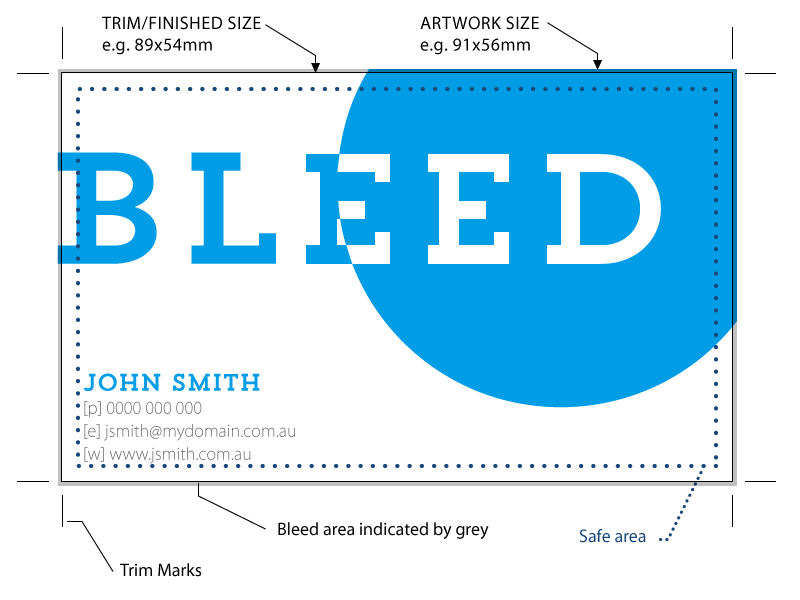
Bleed & offset printing – what is bleed and how to set it by printdomain.com.au
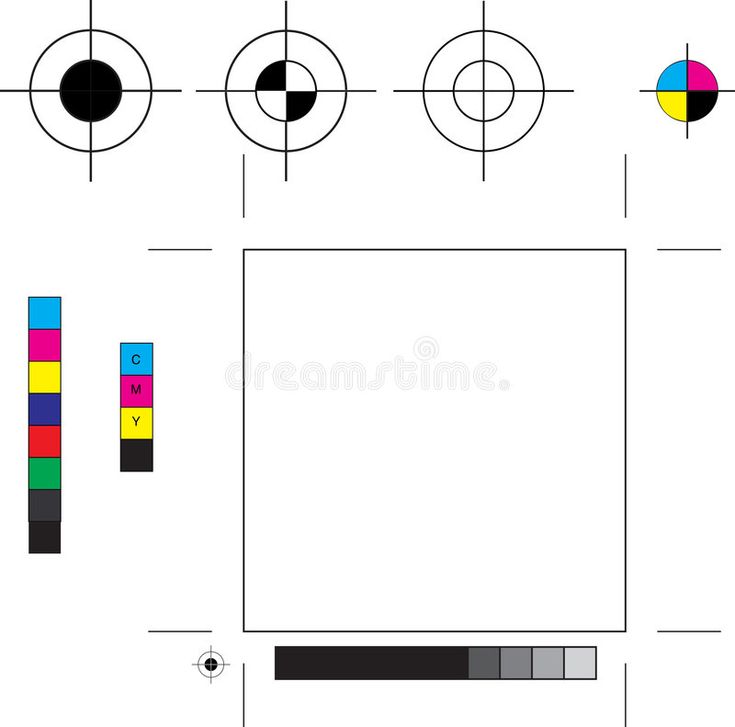
Printer s Marks stock illustration. Illustration of marks - 5929762 by pinterest.com
The Importance of Bleed in Print Design
In print design, bleed serves a critical function by ensuring that finished products do not exhibit unintended white borders after trimming. The bleed area extends design elements beyond trim lines, accommodating potential misalignment with the bleed area during the cutting process. This is particularly crucial for full bleed designs, where solid colors and graphics reach the document edges. A standard bleed of 1/8” (3mm) allows for slight shifts caused by paper handling and machinery. Print bleed is essential for maintaining the visual integrity of designs and preventing errors during the cutting process. Crop marks are essential as they guide precise cutting, ensuring that the design remains intact and visually impactful without exposing raw paper edges. Proper placement of crop marks outside the final trimmed size is vital for achieving accurate trimming results. Including correct bleed settings in the document setup not only enhances the overall aesthetic quality but also protects against misalignments during production. Using coated paper can further enhance print quality, resulting in sharper images and vibrant colors. Coatings play a significant role in improving the durability of printed materials, making them ideal for designs that require longevity and resistance to environmental factors.
Roles of Crop Marks in Print Production
Effective print production relies on accurate trimming, which is greatly aided by the inclusion of crop marks. These marks serve as visual guides for cutting machines, ensuring precise alignment during the trimming process. They define exact trim lines on larger sheets, facilitating batch processing and maintaining design integrity. By marking bleed areas, crop marks prevent unintentional white borders and safeguard critical design elements from accidental removal. They provide uniform reference points across multi-sheet layouts, enhancing registration accuracy. In the end, crop marks contribute to efficient cutting, consistent final sizes, and a higher quality of printed materials, supporting the overall effectiveness of print production. Notably, implementing printers bleed further enhances the visual outcome by ensuring that design elements extend beyond trim marks. Also, using crop marks in conjunction with bleed is essential for designs that reach the edge of the page, preventing any cutting issues. Also be aware that crop marks are essential symbols in the printing industry that indicate where a printed piece should be trimmed. The adoption of ISO Print Standards ensures that the entire print production process, including the use of crop marks, aligns with international quality benchmarks. Also be aware that the use of crop marks is particularly important in UV printing, as it ensures that high-quality finishes are maintained without compromising design elements.
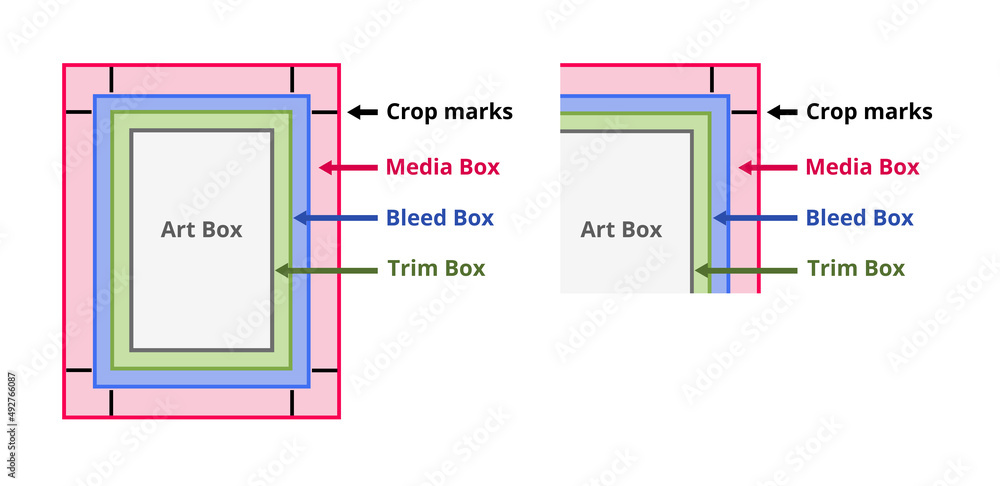
PDF page boxes and bleed. Media box
Popular Wiki Terms:
Common Terminology Related to Crop Marks
Crop marks, also known as trim marks or cut marks, are essential components in the print production process, serving as visual indicators for the cutting and trimming of printed materials. Proofing is critical to ensure that these crop marks align correctly with the intended design. Ink density plays a significant role in ensuring the colors around the crop marks remain consistent and vibrant.
These terms are used interchangeably within the industry. Related concepts include bleed, which refers to design elements extending beyond crop marks to avoid white edges. Crop marks are important for smaller print items like business cards, ensuring that the final product has clean edges.
Safety margins, or safe zones, protect important content by maintaining a buffer of 5mm inward from trim lines. Print production involves multiple steps to ensure quality and accuracy, including the use of cutter lines that represent solid paths for precise cutting, while fold lines, denoted by dashed lines, guide folding operations, ensuring accuracy in the final printed product.
References & Data Sources:
https://www.microsoft.com/en-us/microsoft-365/blog/2011/02/09/what-are-crop-marks-and-why-would-you-want-to-print-them/ – Retrieved April 6, 2025
https://www.vistaprint.com/hub/crop-marks-explained – Retrieved April 8, 2024
https://224664-286886.apps-06.cloudsonic.dev/term/offset-vs-large-format/ – Retrieved January 8, 2025
https://www.colorvisionprinting.com/blog/printing-terminology-what-are-crop-marks?p=8 – Retrieved April 1, 2025
https://action-press.co.uk/blog/understanding-crops-and-bleed/ – Retrieved April 8, 2025
https://pmicreative.co.uk/what-are-cropmarks/ – Retrieved April 8, 2025
https://ironmarkusa.com/bleed-crop-marks/ – Retrieved April 8, 2025
https://224664-286886.apps-06.cloudsonic.dev/term/bleed-area/ – Retrieved April 8, 2025
https://224664-286886.apps-06.cloudsonic.dev/term/bleed/ – Retrieved April 8, 2025
https://www.printdomain.com.au/bleed-for-printing-what-is-bleed-and-how-to-set-it-for-printing/ – Retrieved April 7, 2025
https://www.pinterest.com/pin/printers-marks-registration-separation-and-other-printers-marks-spon-marks-printer-registr--300474606392365303/ – Retrieved April 7, 2025
https://www.gsghome.com/blog-post/why-are-print-bleeds-important/ – Retrieved April 7, 2025
https://printresource.com/learn/detail/bleeds-and-crop-marks-on-print-jobs – Retrieved April 7, 2025
https://www.helloprint.co.uk/blog/what-is-bleed-and-why-is-it-important/ – Retrieved April 7, 2025
https://224664-286886.apps-06.cloudsonic.dev/term/coated-paper/ – Retrieved April 7, 2025
https://224664-286886.apps-06.cloudsonic.dev/term/coatings/ – Retrieved April 7, 2025
https://bowring.co.nz/understanding-crop-marks-and-printers-bleed-in-print-a-complete-guide/ – Retrieved April 7, 2025
https://printworx.co.uk/crop-marks-and-bleed/ – Retrieved April 7, 2025
https://www.cutpasteandprint.com/what-are-crop-marks/ – Retrieved April 7, 2025
https://224664-286886.apps-06.cloudsonic.dev/term/iso-print-standards/ – Retrieved April 7, 2025
https://224664-286886.apps-06.cloudsonic.dev/term/uv-ultraviolet/ – Retrieved April 7, 2025
https://224664-286886.apps-06.cloudsonic.dev/term/ink-density/ – Retrieved April 7, 2025
https://www.betterprinting.co.uk/blog/a-guide-to-printers-marks-and-bleed/ – Retrieved April 7, 2025
https://224664-286886.apps-06.cloudsonic.dev/term/proofing/ – Retrieved April 7, 2025