
Adobe Photoshop Definition
Adobe Photoshop is a professional image editing software widely utilized in graphic design, digital art, and photography. It offers a thorough suite of tools for tasks such as advanced retouching, layer-based editing, and precise color manipulation. Originally developed in 1987, Photoshop has evolved notably, incorporating features like automation, neural filters, and integration within Adobe Creative Cloud. Its extensive functionality enhances workflow efficiency and supports high-quality design output across various applications. Further details reveal its historical impact and ongoing advancements.

Quick Summary
- Adobe Photoshop is a leading software for image editing, graphic design, and digital art creation used by professionals across various design sectors.
- It features advanced tools like layers, masks, and retouching capabilities, establishing it as the industry standard for digital art.
- Continuous updates incorporate user feedback, enhancing functionality and user experience while supporting various file formats.
- Photoshop’s automation tools, like Actions and AI integration, streamline workflows and increase efficiency in design processes.
- It plays a crucial role in color management and printing, ensuring high-quality results for digital and physical materials.
Overview of Adobe Photoshop
Adobe Photoshop is a powerful software application primarily utilized for image editing, graphic design, and digital art creation.
Its core functionality includes layers and masks for non-destructive editing, selection tools for precise object extraction, and advanced photo retouching capabilities such as the Clone Stamp and Healing Brush. Color correction is facilitated through various filters and adjustments, allowing users to modify hue, saturation, and brightness. Photoshop is considered the industry-standard tool for digital art and image manipulation, making it a go-to choice for professionals. Additionally, new tools and features are continuously added based on artist feedback, enhancing the user experience and expanding creative possibilities. Photoshop supports a wide range of file formats, enhancing workflow flexibility. Also be aware that recent updates have introduced tab-based navigation for adjustment presets, making it easier for users to access and organize their tools. The application is integral for graphic designers and artists, enabling them to produce high-quality visuals across diverse projects, from brochures to branding materials. This versatility has made Photoshop a staple in the advertising and publishing industries.
New generative AI features come to Adobe Photoshop by amateurphotographer.com
New generative AI features come to Adobe Photoshop by amateurphotographer.com
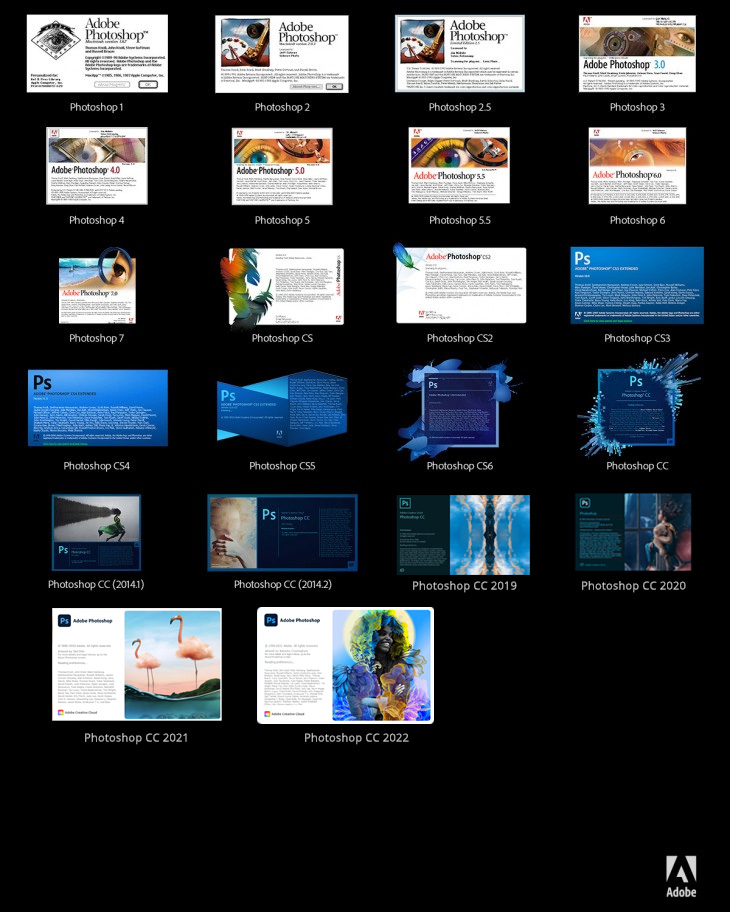
Adobe Photoshop: All Versions List 1990-2025 by psd-dude.com
Historical Development
The historical development of Photoshop traces its origins to 1987, when Thomas Knoll initiated the project as a program called Display, designed to exhibit grayscale images on monochrome monitors.
Collaborating with John Knoll, they expanded it into ImagePro before Adobe acquired distribution rights in 1988.
The first public version, Barneyscan XP, launched in 1989.
Subsequent versions introduced essential features for graphic designers and prepress technicians, including layers, CMYK support, and actions.
The shift to Adobe Creative Cloud integration in 2013 marked a significant evolution, enhancing accessibility and functionality for digital art creation, thereby solidifying Photoshop’s role in the creative industry. Adobe purchased full rights in 1995 for $34.5 million, further establishing its dominance in the market. The introduction of artificial intelligence integration in Photoshop CC 2024 has further transformed the software, enhancing design processes and automating repetitive tasks. This evolution reflects the introduction of layers in version 3.0, which provided greater editing flexibility and control for users.
Latest Adobe Photoshop version adds Generative Fill AI tools ... by amateurphotographer.com
Core Functionality
Core functionality in image editing software encompasses a range of precise tools and features that enhance user capabilities.
Image editing precision is achieved through advanced retouching tools and non-destructive edits, allowing users to make intricate adjustments. Layer-based editing is a critical feature that supports design flexibility through hybrid graphic capabilities, enabling seamless integration of raster and vector elements. This software is widely used in photo editing, demonstrating its versatility in enhancing images. The incorporation of generative AI features allows for automatic removal of distractions, further streamlining the editing process. Also, the integration of digital printing techniques can enhance the output quality of finalized images, ensuring they are print-ready for various applications.
Workflow enhancements include Creative Cloud synchronization and AI-powered automation, streamlining the editing process.
Finally, color and light management tools facilitate tonal control and chromatic balance, ensuring accurate representation of images.
Together, these elements empower users to produce high-quality visual content efficiently and effectively.
Key Features
Key features of image editing software encompass a variety of sophisticated tools and functionalities designed to enhance user capabilities in graphic design and digital art creation. Layers and non-destructive editing facilitate creative freedom by allowing adjustments without altering original files. Advanced selections and retouching tools, including Lasso and Healing Brush, enable precise modifications. Additionally, Adobe Photoshop supports a layer-based editing system, which allows users to work with multiple overlays that enhance their creative options. The extensive selection of filters and effects available in Photoshop further enriches the editing process, enabling users to create unique looks and styles. Color manipulation systems provide robust controls for adjusting hue, saturation, and contrast. Productivity and workflow enhancements, such as automated tasks and Creative Cloud integration, streamline the editing process. These features collectively support a thorough approach to professional image editing and design.
Applications in Design
Applications in design utilize Adobe Photoshop’s extensive capabilities across multiple disciplines, including image editing, graphic design, and multimedia creation. Print production specialists rely on its features for commercial printing projects, ensuring high-quality results. Layout design benefits from Photoshop’s ability to create intricate compositions, allowing for precise control over text and imagery. Additionally, industry-leading graphic design tools facilitate seamless integration with other Adobe products, enhancing workflow efficiency. Also, designers can start with a 7-day free trial to explore all features before committing to a membership. Packaging mockups can be developed using 3D rendering tools, facilitating realistic presentations for product designs. Also be aware that Adobe Creative Cloud provides access to tutorials that help designers at all skill levels enhance their skills. Importantly, its advanced typographic features support detailed text manipulation, which is essential for professional layouts. CorelDRAW, a vector graphics editor, is also a critical tool for creating high-quality print materials.
By integrating these functionalities, designers streamline workflows and enhance collaboration, ensuring that final outputs meet industry standards. This all-encompassing approach supports various sectors and elevates the overall quality of design work.
Popular Wiki Terms:
Evolution of Tools and Techniques
The evolution of tools and techniques in Adobe Photoshop has considerably transformed the landscape of digital image editing and graphic design. Early versions introduced essential tools like Marquee and Move, which laid the groundwork for image manipulation. As enhancements emerged, features such as layers and adjustment layers revolutionized non-destructive editing for publishing and brochure design. The integration of ICC color profiles improved color management across devices, critical for digital printing, and maintaining ink density is vital for achieving accurate color reproduction. The choice of 120gsm paper further complements the visual quality of printed materials. Automation tools like Actions increased workflow efficiency, while advancements in content-aware technologies refined image processing. Notably, the introduction of neural filters in Photoshop CC 2021 further expanded creative possibilities for users. Collectively, these developments have established Photoshop as an indispensable tool for professionals in various design sectors, with the introduction of layers in Photoshop 3.0 serving as a pivotal moment in its evolution. The software’s acquisition by Adobe in 1988 marked a significant turning point, allowing for further development and widespread adoption.
References & Data Sources:
https://www.andacademy.com/resources/blog/graphic-design/what-is-photoshop/ – Retrieved April 6, 2025
https://www.callthedesignguy.com/post/how-to-use-photoshop – Retrieved April 8, 2024
https://helpx.adobe.com/photoshop/using/whats-new.html – Retrieved January 8, 2025
https://224664-286886.apps-06.cloudsonic.dev/term/adobe-illustrator/ – Retrieved April 1, 2025
https://amateurphotographer.com/latest/photo-news/new-generative-ai-features-come-to-adobe-photoshop/ – Retrieved April 8, 2025
https://www.psd-dude.com/tutorials/resources/adobe-photoshop-twenty-five-years-anniversary-infographic.aspx – Retrieved April 8, 2025
https://en.wikipedia.org/wiki/Adobe_Photoshop – Retrieved April 8, 2025
https://www.agitraining.com/adobe/photoshop/classes/what-is-photoshop – Retrieved April 8, 2025
https://v4development.com/blog/our-blog-post-four-36 – Retrieved April 8, 2025
https://amateurphotographer.com/latest/photo-news/latest-adobe-photoshop-version-adds-ai-tools/ – Retrieved April 7, 2025
https://skylum.com/blog/adobe-photoshop-review – Retrieved April 7, 2025
https://vdci.edu/blog/what-is-adobe-photoshop – Retrieved April 7, 2025
https://blog.adobe.com/en/publish/2024/10/14/photoshop-delivers-powerful-innovation-for-image-editing-ideation-3d-design-more – Retrieved April 7, 2025
https://224664-286886.apps-06.cloudsonic.dev/term/digital-printing/ – Retrieved April 7, 2025
https://ogfeed.com – Retrieved April 7, 2025
https://www.techtarget.com/whatis/definition/Photoshop – Retrieved April 7, 2025
https://mapsystemsindia.com/resources/best-photoshop-features.html – Retrieved April 7, 2025
https://www.adobe.com/creativecloud/design.html – Retrieved April 7, 2025
https://www.adobe.com/products/photoshop/free-trial-download.html – Retrieved April 7, 2025
https://www.adobe.com/creativecloud/tools/graphic-design-software.html – Retrieved April 7, 2025
https://224664-286886.apps-06.cloudsonic.dev/term/adobe-indesign/ – Retrieved April 7, 2025
https://224664-286886.apps-06.cloudsonic.dev/term/coreldraw/ – Retrieved April 7, 2025
https://224664-286886.apps-06.cloudsonic.dev/term/ink-density/ – Retrieved April 7, 2025
https://224664-286886.apps-06.cloudsonic.dev/term/120gsm-paper/ – Retrieved April 7, 2025
https://filtergrade.com/history-of-photoshop-through-the-years/ – Retrieved April 7, 2025
https://profiletree.com/what-is-photoshop/ – Retrieved April 7, 2025